AI SEO Software Review for Small Websites: What Actually Works in 2026
Small website owners face a tough choice. You need SEO tools to rank. But most paid tools cost too much...
Gadgets & Technologies Are Together

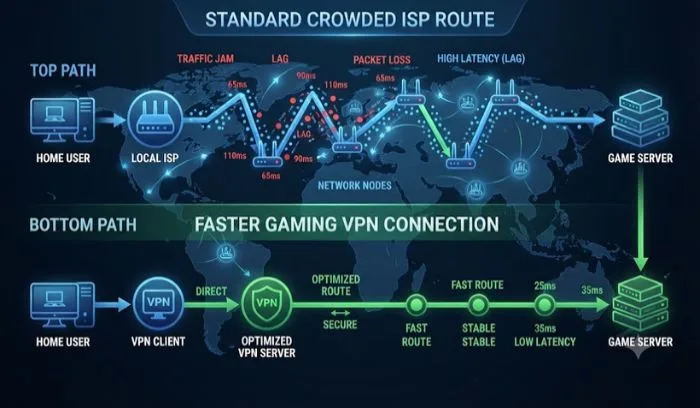
Lag ruins gaming. You line up a shot and the game freezes. You die. You lose rank. The problem is often your connection route, not your internet speed. A gaming VPN can fix this by finding a faster path to the game server. This guide covers the best VPN for gaming low ping in 2026.
We tested top options for speed, latency, and server coverage. NordVPN takes the top spot with only 3% speed loss. ExpressVPN offers global server access. Surfshark gives the best value. We also cover free options and setup tips to get your ping as low as possible. No fluff. Just what works.
A VPN encrypts your data and sends it through a tunnel to a remote server . This can actually give you a shorter, faster route to the game server. Sometimes your Internet Service Provider uses slow, crowded paths. A VPN can bypass these and reduce lag.
Two things matter for gaming: speed and latency (ping). Competitive gamers want ping under 100ms. Anything above that and the game feels sluggish . A good VPN keeps the added delay under 20ms, which you will not even notice .
Read More: Best WordPress Plugin Reviews: Top Tools for Your Website
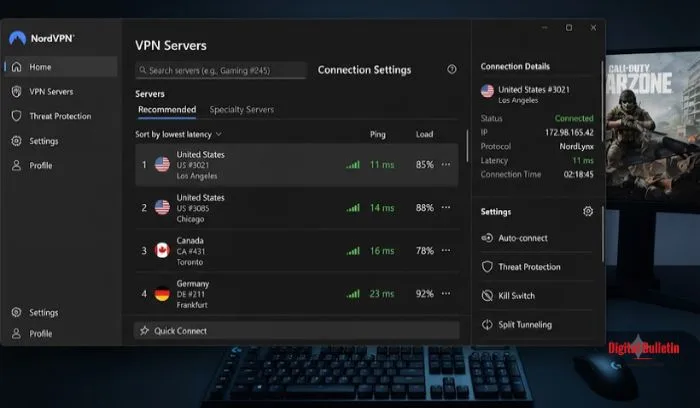
NordVPN takes the top spot for speed . Our speed tests show it only slowed connections by 3%, which is excellent . It also has servers in 130 countries, so you can always find one near your game server.
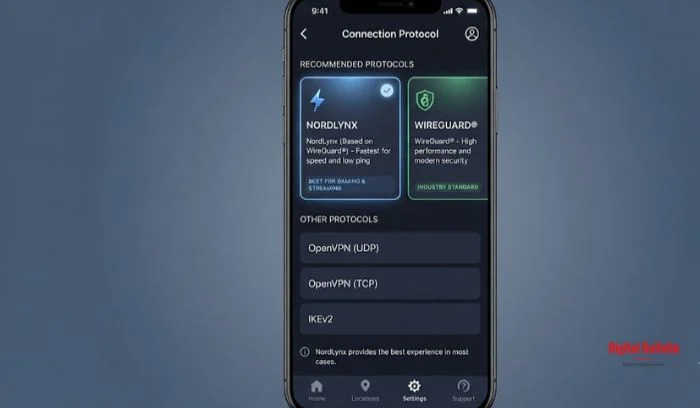
The NordLynx protocol is built for speed. Tests show it is about 57% faster than older protocols . Ping overhead on nearby servers is only about +9 to +13ms, well under the 20ms threshold .
A unique feature is Meshnet. It lets you set up remote LAN parties with friends anywhere in the world . Great for reviving old games that only support local multiplayer.
ExpressVPN has servers in 105 countries, including all 50 US states . This is excellent for gamers who need to connect to servers in specific regions. It also offers two fast protocols: Lightway and WireGuard . Both give you speed without sacrificing security.
The only downside is price. ExpressVPN costs more than most options . But for serious gamers who need the best global coverage, it is worth it.
Surfshark gives you the best bang for your buck . You get fast speeds, unlimited device connections, and solid privacy features at a lower price. The value is excellent for gamers on a budget.
Free VPNs often look tempting. But there are serious trade-offs.
PCMag's experts warn that free VPNs often have strict data limits and slow speeds . Some even sell your data. They also limit the number of devices you can connect. This is a problem if you game on multiple devices .
That said, there are some free options that can work:
This app offers free unlimited connections with servers in over 80 countries . It specifically mentions lowering ping for Free Fire, PUBG, and Call of Duty Mobile . Available on iOS and Android. Users rate it highly .
This free VPN includes a "Game Mode" for low-latency gaming . It also has a live ping display to help you pick the fastest server. Good option for Android users.
Important: Free VPNs are less reliable. You get what you pay for. For serious competitive gaming, a paid VPN is a better investment .
You May Also Read: VPN Software Review: Safest and Fastest Options Compared
The rule is simple: connect to a server near your game server, not necessarily near you . For most games, these are the same. If you are in India playing on European servers, connect to a German or Netherlands server, not the UK .
NordVPN users should use NordLynx . ExpressVPN users should use Lightway or WireGuard . These are the fastest protocols. OpenVPN is slower and should be avoided for gaming .
How to switch:
This is a game-changer. Split tunneling lets you route some apps through the VPN and others through your regular internet .
The best setup: route your game through the VPN for protection. Keep Discord or TeamSpeak outside the tunnel to reduce voice latency .
Available on Windows and Android for most VPNs .
Do not use these while gaming:
These features are for privacy activists, not gamers. They add latency and kill your ping .
The best VPN for gaming low ping in 2026 is NordVPN for its exceptional speed and stable performance. ExpressVPN is the choice for global server access. Surfshark gives the best value for budget-conscious gamers.
Free options like VPN.lat can work for casual play, but paid VPNs offer reliable performance for competitive gaming. Set up your VPN correctly: pick the closest server, use the fastest protocol, enable split tunneling, and turn off unnecessary privacy features. These tweaks will get you the lowest ping possible.
Yes, if it finds a faster route to the game server. But it can also increase ping if you connect to a server far away. Always pick the closest server to your game's server.
VPN.lat is a good free option. It has servers in 80+ countries and specifically optimizes for Free Fire, PUBG, and COD Mobile. However, paid VPNs like NordVPN and ExpressVPN give more consistent performance.
NordVPN and ExpressVPN both have excellent Android apps. For free options, VPN.lat and Exir VPN are popular choices with good ratings.
Yes. A VPN hides your real IP address. This prevents malicious players from targeting you with DDoS attacks. NordVPN and ExpressVPN both offer strong DDoS protection .
Yes, but not directly. You need to set up the VPN on your router or use a PC to share the connection. Some VPNs like NordVPN and ExpressVPN offer router apps or guides for this setup.