How to Transfer WhatsApp to New Phone: Complete Guide
Got a new phone? Exciting, right? Then you remember your WhatsApp chats. Years of messages. Photos. Memories. All stuck on...
Gadgets & Technologies Are Together

Picking a VPN these days feels like a headache. Open any website and you will see dozens of options. Everyone claims they are number one. But you know that cannot be true. Some VPNs actually protect your privacy. Others? They track what you do and sell that information to advertisers.
Some give you fast connections. Many slow your internet down to the point where you want to throw your computer out the window. So how do you choose the best VPN service? A few things. Security is obvious. Speed too. But also look at where the company is based. Check if they have been audited. Read the fine print on pricing.
Think of a VPN as a secure tunnel for your internet traffic. When you connect to public Wi-Fi at a cafe, airport, or hotel, your data is exposed. Hackers can easily intercept what you're doing, from checking emails to making payments . A VPN encrypts this traffic, making it unreadable to anyone trying to peek in.
But there's more to it. Without a VPN, your internet service provider can see your entire browsing history the sites you visit, the shows you watch, and even your location . They often use this data for advertising or sell it to others. A VPN stops this by hiding your IP address and making your online activity private .
Read More: How to Check Passport Status Online in India: Complete Guide
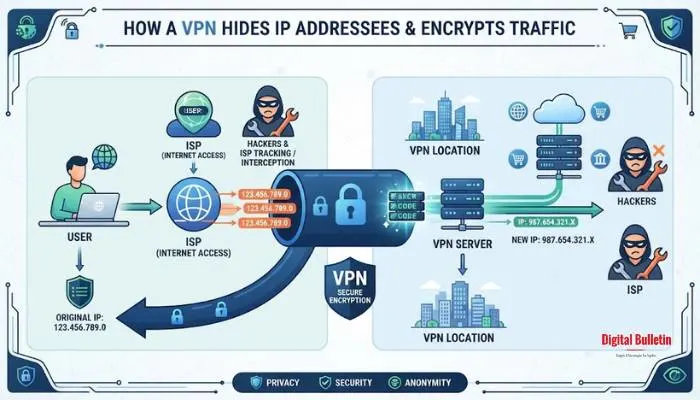
To choose the best VPN service for your needs, focus on these six critical areas.
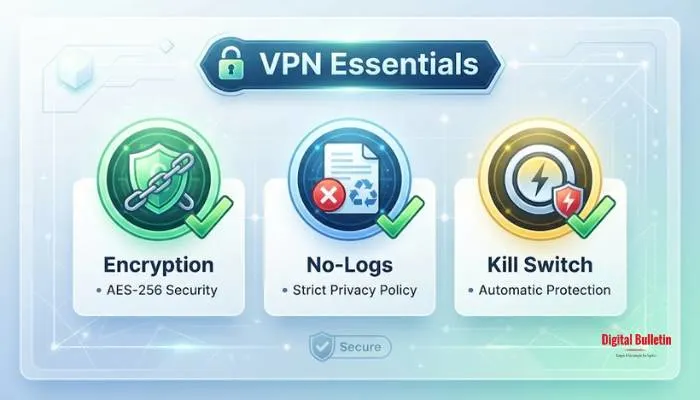
The backbone of any good VPN is encryption. Look for AES-256 encryption, the standard used by governments and banks worldwide . This ensures your data stays locked tight.
The protocol matters too. OpenVPN is a solid all-round choice, while WireGuard and IKEv2 offer excellent speed and security for mobile devices . Avoid outdated protocols like PPTP, which are vulnerable to attacks .
Every VPN claims not to keep logs, but you need proof. A genuine no-logs policy means the service doesn't store your browsing history, IP address, or connection timestamps .
How to verify: Look for VPNs that have undergone independent third-party audits from firms like Cure53 or KPMG . These audits confirm the company's privacy claims. Also check if the VPN is based in a privacy-friendly jurisdiction like Switzerland or the British Virgin Islands, outside of intelligence-sharing alliances like the Five Eyes .
A large server network offers more options for connecting and improves speed by reducing congestion . If you want to access content from specific countries, ensure the VPN has servers there .
Speed is key, especially for streaming or gaming. While any VPN will slow your connection slightly due to encryption, top providers minimize this impact . Features like split tunneling let you route only specific apps through the VPN, which can boost performance for everyday browsing .
These features are non-negotiable for security. A kill switch cuts your internet connection if the VPN drops unexpectedly, preventing your real IP address from being exposed . Similarly, DNS and IPv6 leak protection prevent accidental data leaks while the VPN is active .
Check that the VPN works on all your devices—Windows, Mac, Android, iOS, and even routers or Smart TVs . Also, consider how many simultaneous connections you need. Many top VPNs allow 6 to 10 devices, and some offer unlimited connections .
VPN pricing varies, but look for a money-back guarantee so you can test the service risk-free . 24/7 live chat support is a big plus for quick problem-solving .
When comparing options, ask yourself these questions:
Free VPNs can be a good starting point, but they come with trade-offs. Top free options like Proton VPN offer unlimited data with no logs, but you're limited to fewer servers and a single connection . TunnelBear gives you a generous 2GB monthly but restricts access to all servers .
Be cautious some free VPNs collect and sell user data. Stick to services with transparent privacy policies and independent audits .
Based on expert reviews and real-world testing, here are the top VPNs that consistently stand out:
Best Overall
Proton VPN offers everything you need, with an unbeatable free tier. It has strong privacy, open-source apps, and excellent streaming support .
Best Premium Features
Known for its incredible speed and extensive feature set, including multi-hop and Tor over VPN. It has one of the largest server networks .
Best for Multi-Device Protection
Offers unlimited simultaneous connections and a complete privacy suite at a competitive price .
Best for Location Spoofing
Slick interface, fast speeds, and a strong commitment to privacy. Its Lightway protocol is built for reliability .
Best for First-Time Users
With a playful design and excellent beginner-friendly interface, TunnelBear is perfect for those new to VPNs .
Best for Smart TV Users
Specialized servers for streaming and torrenting, combined with a large server network .
Best for Unlimited Device Coverage
Allows unlimited device connections with good speeds and robust privacy features .
Best for Public Wi-Fi Use
Offers anonymous signup without requiring an email address and has a simple, affordable pricing model .
Best Browser Extensions
Known for its transparency, generous free plan, and useful ad-blocking features .
Best for Frequent Travelers
Provides a full-featured free plan, great performance, and supports up to 10 devices .
You May Also Read: How to Open PPF Account Through SBI Online Full Step by Step Guide
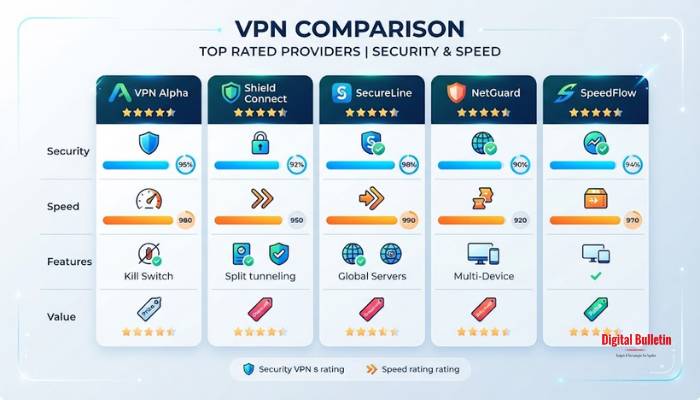
Protecting your mobile device is just as important. Here are the best VPNs specifically for Android:
Choosing the best VPN service doesn't have to be complicated. Start by identifying your needs, whether it's privacy, streaming, or just safe browsing. Then, check for the essentials: strong encryption, a verified no-logs policy, and a kill switch. Test a service with a free trial or money-back guarantee to ensure it fits your routine.
Some are okay. But most have a catch. They track what you do and sell that info. That beats the whole point of using a VPN. Proton VPN is one of the few free ones you can trust. But even then, you get fewer servers and slower speeds.
Yes, a little. Your data gets encrypted, so that takes some processing power. Good VPNs keep the speed drop small. You might not even notice it. Cheap ones? They can make your internet drag. That gets frustrating.
Most VPNs let you connect 5 to 10 devices. Some let you connect as many as you want. Surfshark does this. If you have lots of gadgets at home, look for unlimited connections.
You have to look for proof. Independent audits are a good sign. Security firms check the systems and confirm what the company says. Also check where the VPN is based. Some countries have stronger privacy laws. Switzerland and Panama are better choices than the US.
This is where the kill switch helps. It cuts your internet right away if the VPN drops. Without it, your real IP address gets exposed. That is exactly what you are trying to hide. So keep this feature turned on at all times.