How to Transfer WhatsApp to New Phone: Complete Guide
Got a new phone? Exciting, right? Then you remember your WhatsApp chats. Years of messages. Photos. Memories. All stuck on...
Gadgets & Technologies Are Together

If you are looking for a safe way to save money and also save tax, then PPF is a good choice. PPF full name is Public Provident Fund. It is a government saving scheme. Many people in India use PPF for their long term goals like child education or retirement.
SBI is the largest bank in India. Most people have their SBI account. The good thing is that you do not need to go to the bank branch to open PPF account anymore. You can open it online from your home. In this article, I will tell you the exact method to open PPF account through SBI online.
PPF account is a small saving scheme started by the government of India. You put money in this account every year. The government gives you interest on that money. At present, the interest rate on PPF is around 7.1 percent. This rate changes every three months but it is always more than a normal savings account.
The best thing about PPF is that the money you put is tax free under section 80C. Also the interest you earn is tax free. The final amount you get after 15 years is also tax free.
PPF account has a lock in period of 15 years. That means you cannot take all the money before 15 years. But you can take loan against your PPF money after some years. You can also withdraw some money after 5 years for special needs like health or marriage.
For a common Indian middle class family, PPF is a very safe option. There is no risk because it is a government scheme. Even if the bank closes, your PPF money is safe with the government.
Read More: How to Generate QR Code for UPI Payment - Free Online Guide
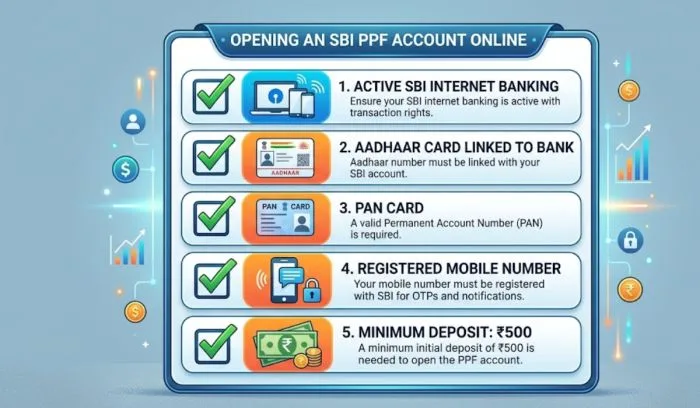
Before you learn how to open PPF account through SBI online, you should know if you are eligible. The rules are very simple.
If you are an Indian citizen with a single account in SBI, you are fully eligible to open PPF account online.
To open PPF account through SBI online, you need a few things ready. Keep them near you. This will save time.
Active SBI Internet Banking – You must have your SBI net banking user ID and password. Without this, you cannot open PPF account online. If you do not have net banking, go to your home branch and get it activated first.
Mobile Number Linked to SBI Account – Your mobile number must be registered with your SBI savings account. You will get OTP on this number during the process.
Aadhaar Card – Your Aadhaar must be linked to your SBI account. The bank will use your Aadhaar details for KYC.
PAN Card – PAN card is needed for PPF account because it is a tax saving investment. Your PAN must also be linked to your SBI account.
Minimum Deposit Amount – You need at least 500 rupees to open the PPF account. You can put more but minimum is 500. Maximum in one year is 1.5 lakh rupees.
Once you have all these things, you can start the process.
Now I will give you the full process. Follow each step exactly. Do not skip anything. I have written this in very simple words so that anyone can understand.
Open your computer or mobile phone. Go to the SBI net banking website. The address is onlinesbi.com. Do not search on Google. Type it correctly in the address bar.
Enter your username and password. Then enter the captcha code. Click on login. If you have set up any extra security like OTP, enter that also.
After login, you will see many options. Look at the top menu. You will see an option called "e-Services". Click on that. Then a drop down menu will open. In that menu, find and click on "e-Tax". Under e-Tax, you will see "PPF Account". Click on that.
Some SBI versions have a different path. If you do not see e-Services, then go to "Accounts" or "Deposits" section. Look for "Public Provident Fund". The name is clearly written. Do not worry.
When you click on PPF account, a new page will open. On this page, you will see two options. One is "Open PPF Account" and second is "View PPF Account". Select "Open PPF Account".
Now the system will ask for your customer ID. Your customer ID is written on your SBI passbook or on the first page of your net banking. Enter that number carefully. Then click proceed.
Now you will see a form. This is the SBI PPF account opening form but online version. Most of the details will already be filled because the bank knows you. But you must check everything.
Check your name. It should be exactly as per your PAN card. Check your date of birth. Check your father's name. Check your address.
If something is wrong or missing, you can edit it. But if your Aadhaar is linked, then most information will be correct. Do not change anything without reason.
You will also be asked to choose a nominee. A nominee is the person who will get the PPF money if something happens to you. You can choose your wife, husband, child, or any family member. Give their name and their relation to you. If you do not want to give a nominee right now, you can leave it for later. But it is better to fill now.
After filling the form, the system will send a one time password or OTP to your registered mobile number. Enter that OTP in the box. Click verify.
Some people also get an OTP on their email. Check both places.
Your PPF account will not open without money. You have to deposit at least 500 rupees. This money will come from your SBI savings account.
The page will show you an option to transfer money. Select the amount you want to deposit. You can put 500 rupees only or you can put more. Remember that the maximum for one financial year is 1.5 lakh rupees. The financial year starts from 1st April and ends on 31st March.
After selecting the amount, click on pay. You will be asked to confirm the transaction. Use your net banking password or OTP to confirm.
After the money is taken from your account, you will see a success message. This means your PPF account opening request is submitted. The bank will check your details. This checking is called verification.
Sometimes the PPF account is opened immediately. Sometimes it takes 1 to 2 working days. You will get an SMS and email when your PPF account is fully active. You will also get a PPF account number. Write this number in a safe place.
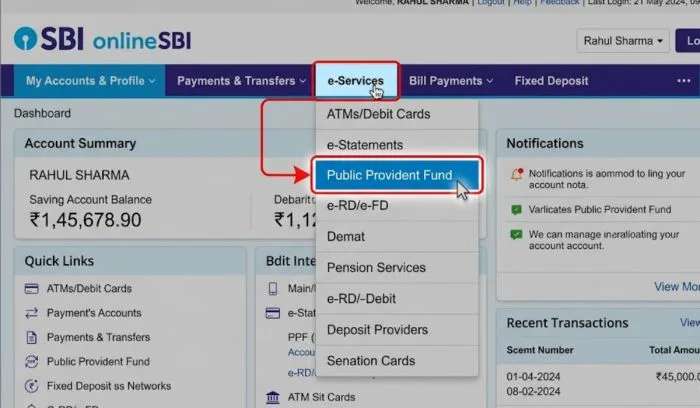
Once your PPF account is open, you will want to check your balance. You should check every few months to see your interest and total amount. Here is how to check SBI PPF account balance online.
Login to your SBI net banking account. Go to e-Services again. Then e-Tax. Then PPF Account. This time do not click open. Click on "View PPF Account".
The system will ask for your PPF account number. Enter that number. Then you will see your full PPF account summary. You will see your total deposit, interest earned so far, and total balance.
If you have SBI Yono app on your mobile phone, open it. Login using your MPIN. Then go to the deposits section. Find PPF. Click on it. You will see your PPF balance instantly. This is the fastest way.
You can also check SBI PPF account balance by sending an SMS. But for that, you must register for SBI quick services. Most users find net banking and Yono app easier. So I suggest you use those.
You May Also Read: How to Check PMAY Application Status Online India - PMAY 2.0 Guide
Many people do not know this. Your PPF account is for 15 years. But after 15 years, you do not have to close it. You can extend your PPF account in blocks of 5 years. And yes, you can do this extension online in SBI.
So the answer to "can I extend my PPF account online in SBI" is yes. You can extend it very easily.
You must apply for extension within one year from the date your 15 year period ends. If you miss this time, the bank will think you want to close the account. So do not delay.
Login to your SBI net banking. Go to e-Services, then e-Tax, then PPF Account. Look for an option called "Extension of PPF Account" or "Extend PPF". Click on that.
You will be asked to choose the extension period. You can choose 1 block of 5 years or 2 blocks of 5 years. That means you can extend for 5 years or 10 years.
After selecting, click submit. You do not need to pay any extra fee for extension. Your PPF account will continue and you can keep putting money in it.
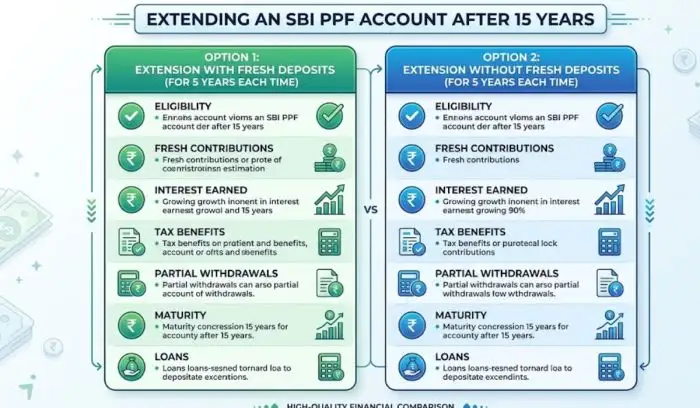
SBI gives you two choices during extension.
Without fresh deposit – In this type, you do not put new money. But your existing money stays in the account and keeps earning interest. You can take out money anytime.
With fresh deposit – In this type, you keep putting new money every year. This is good if you still want to save tax. You can put up to 1.5 lakh rupees per year. But you can only withdraw once in a year.
Most people choose the second type because they still want to save tax.
Some people still like to do things on paper. They ask for SBI PPF account opening form. Let me explain the difference between online and offline form.
When you open PPF account through SBI online, the form you fill on the website is the digital SBI PPF account opening form. You do not need to print anything. You do not need to sign anything with pen. Your digital signature and OTP are enough.
If you go to the SBI branch, you will ask for Form A. This is the physical SBI PPF account opening form. You have to fill it with a black pen. Then you have to submit it with your photo, PAN copy, and address proof. You also have to give a cheque or cash for the first deposit. The branch officer will then open your account in 2 to 3 days.
Online is better for most people. It is faster. You do not have to stand in line. You do not have to pay for photocopies. You can do it at night or on Sunday also. Offline is only for those who do not have internet banking or who feel more comfortable with paper.
Before you put money in PPF, you should know how much your money will grow. The SBI PPF calculator helps you do that. This tool is available on SBI website and on many other finance websites.
It is a simple tool. You enter three things. First is how much money you will put every year. Second is for how many years you will put money. Third is the current interest rate. The calculator then tells you the total amount you will get at the end.
The calculator will show you two numbers. One is the total money you put in. Second is the total money you get at the end including interest. The difference is the interest you earned.
Suppose you put 50000 rupees every year for 15 years. Total money you put from your pocket is 7.5 lakh rupees. With interest at 7.1 percent, you will get around 14 lakh rupees at the end. This means your money almost doubled.
You can try different amounts in the SBI PPF calculator. Put 1.5 lakh every year for 15 years. Your total investment is 22.5 lakh rupees. Your final amount will be around 42 lakh rupees. This is a very good return for a safe government scheme.

Sometimes people face problems when they try to open PPF account through SBI online. Here are some common issues and how to fix them.
If you do not see PPF option under e-Services, it means your net banking is not fully activated. Some SBI accounts have limited net banking. You need to visit your home branch and ask for full net banking access. Tell them you want to open PPF online. They will activate it in 5 minutes.
If you get a message saying Aadhaar not found, then your Aadhaar is not linked. You can link it online through SBI net banking. Go to My Account and then Link Aadhaar. Or you can visit the branch. Without linked Aadhaar, you cannot open PPF online.
This happens if your mobile number is old or not registered. Check your mobile number in your SBI passbook. If it is wrong, go to the branch and update your mobile number. After update, wait 24 hours. Then try opening PPF account again.
Remember that one person can have only one PPF account. If you already have a PPF account in any other bank like Post Office or HDFC, you cannot open another one. You can only transfer that account to SBI. Transfer is a different process. You cannot open a new one.
Many people open PPF account but do not know the rules. Then later they face problems. Read these rules carefully.
Opening a PPF account through SBI online is very easy if you follow the correct steps. You do not need to go to the bank. You do not need to fill any paper form. You just need your SBI net banking, linked mobile number, Aadhaar, and PAN card. The whole process takes less than 10 minutes.
After opening the account, remember to check your SBI PPF account balance every few months. Use the SBI PPF calculator to plan how much to save. And after 15 years, do not forget that you can extend your PPF account online in SBI for another 5 or 10 years.
PPF is not a get rich quick scheme. It is a slow and steady way to build a big fund for your future. Start today with 500 rupees. Then add regularly. After 15 years, you will thank yourself.
Yes. You can open PPF account for your minor child. You will be the guardian. The process is same. But you will need the child's Aadhaar and PAN if the child has one. If child does not have PAN, you can still open using the child's birth certificate. But it is easier to open offline for a minor.
Yes. PAN is compulsory because PPF is a tax saving instrument. The bank reports your PPF investment to the income tax department using your PAN.
The current PPF interest rate is 7.1 percent per year. This is set by the government every three months. SBI follows the same rate. Check the official SBI website for the latest rate.
You cannot close your PPF account before 15 years unless there is an emergency. The government allows early closure only for very serious reasons like a life threatening disease or for higher education of your child. You have to give proof. If allowed, you will get less interest.
You can extend your PPF account as many times as you want. Each extension is for 5 years. There is no limit on number of extensions. Some people keep their PPF account for 30 years or more.