How to Grow on Bluesky: Get Followers and Go Viral
Bluesky is not X. It is not Threads, it is not Instagram. That is the first thing you need to...
Gadgets & Technologies Are Together

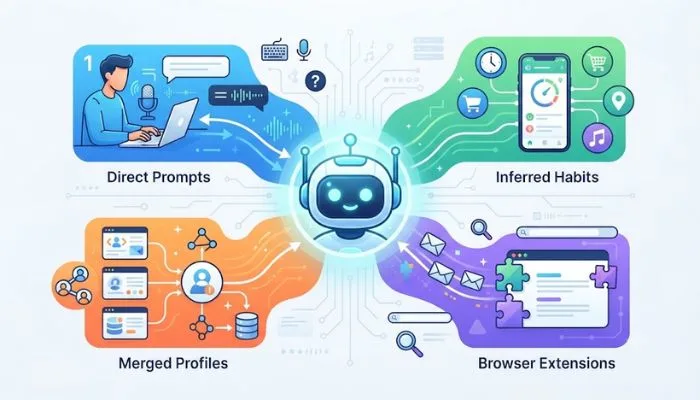
AI tools collect more data than most people realise. Every prompt you type. Every file you upload. Every conversation you have. It can all be stored and used for training. A Stanford study found that all six major AI developers use chat data by default. Some keep it indefinitely.
So how to protect personal data from AI? It starts with awareness. Treat every prompt as public. Never share what you cannot afford to lose. Anonymise sensitive information before you type. Adjust your privacy settings. Delete old chats. Use privacy-first tools when possible. This article breaks down how AI collects your data and what you can do about it.
AI tools collect data in several ways. The most obvious is what you type. But it goes further than that.
Read More: How to Free Up Google Drive Storage Without Paying
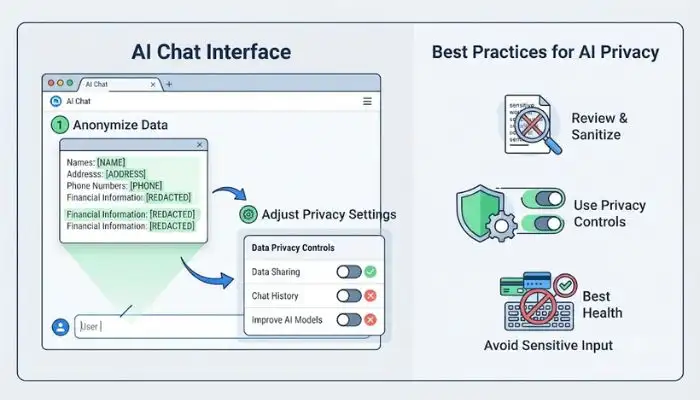
The single most important rule: never type anything into an AI tool that you would not want to see published. Names, addresses, health details, financial information, work secrets. All of it should stay out .
If you must use sensitive data, anonymise it first. Remove names and identifying details before you type .
Most AI tools have settings to control data usage. Check for options to:
These settings are not always easy to find. Look in privacy or data controls sections.
Some tools are built with privacy in mind. PrivacyAI Shield is a browser extension that redacts personal information locally before prompts are sent to AI services. It works with ChatGPT, Claude, Gemini, and others .
For developers, frameworks like Presidio detect and redact PII before it reaches an LLM .
The extension harvesting scandal showed that trust badges mean nothing. Before installing any extension, check what data permissions it requests. If an extension asks to "access data on all AI chat websites," ask why .
Once you send data to an AI tool, you lose control. The company decides how long to keep it, whether to use it for training, and who can review it. Some developers allow human reviewers to read chat transcripts .
This is why the best protection is prevention. Do not share what you cannot afford to lose.
You May Also Read: How to Free Up Google Drive Storage Without Paying
If you run a business, you have obligations.
AI tools collect more than you think. Your prompts, files, and inferred data can be stored, merged, and used in ways you do not control. The best protection is prevention. Treat every prompt as public.
Anonymise sensitive information. Adjust your settings. Delete what you do not need. For businesses, implement guardrails and conduct privacy assessments. AI is useful. But it is not private by default.
Yes, by default. A Stanford study found all six major US AI developers use chat data for training unless you opt out . Some keep it indefinitely.
Yes. Most tools let you delete conversations. Some also let you delete your entire account, which removes stored data . Do this regularly.
Risky. Uploaded files can contain sensitive data. Some developers train on files you upload during conversations . Avoid uploading contracts, medical records, or financial documents.
Memory accumulation. AI agents increasingly remember everything about you across sessions. When data from different contexts mixes, it can leak in ways you never intended .
Yes. AI draws inferences from what you say. Asking for heart-healthy recipes might lead the AI to classify you as health-vulnerable. That inference can be stored and used .
Not always. A 2026 investigation found extensions collecting AI chat data from 8 million users without consent . Check permissions before installing.
Treat every prompt as public. Anonymise sensitive data. Adjust privacy settings. Delete old chats. Use privacy-first tools when possible .
Implement PII redaction before AI use. Use privacy-enhancing technologies. Conduct impact assessments. Test defences against agentic attacks .