Upcoming Features in Popular Apps: AI, Privacy and More
Popular apps never stop changing. New updates arrive every month. Some are small fixes. Others change how you use the...
Gadgets & Technologies Are Together

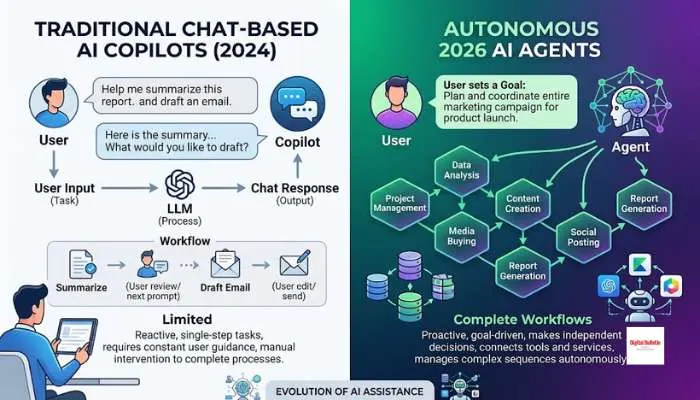
Productivity software changed a lot this year. The big shift? AI stopped just answering questions. Now it does the work.
New AI features in productivity software are all about agents. They run on schedules. They connect to your data. They finish tasks while you do something else. Notion users built over a million of them. Microsoft lets you create your own inside Copilot Studio. Google's Gemini runs tasks in the background. Free tools cover most needs too. ChatGPT. NotebookLM. Perplexity. You do not need to pay for everything.
For the past two years, AI in productivity software meant chat assistants. You asked a question. It answered. That era is ending.
The numbers show real adoption. Pigment, a French SaaS company, reports 70% of employees now use Notion's Custom Agents weekly. SumUp, with over 3,000 employees on Notion, uses agents to generate tasks from meeting notes, triage marketing requests, and run team reports .
Read More: How Blockchain Features Improve Security | Blockchain Guide
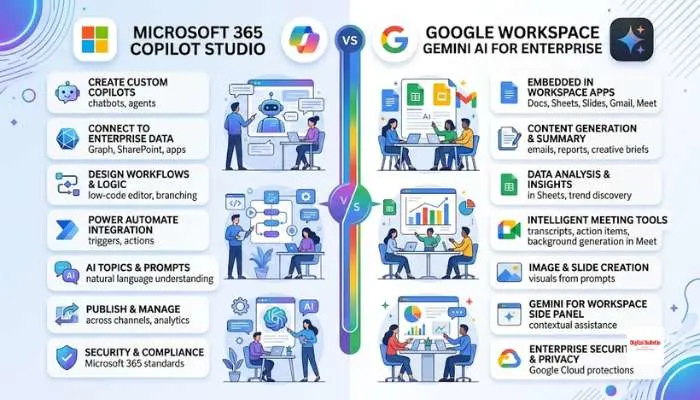
Microsoft Copilot is the most widely deployed enterprise AI tool. It lives inside Word, Excel, PowerPoint, Outlook, and Teams. The key advantage is data grounding through Microsoft Graph. Copilot can see your emails, files, chats, and calendar, then use that context to help .
New features in 2026:
The limitation: Copilot's advanced features require a paid Microsoft 365 Copilot license, which costs around $30 per user per month as an add-on. The free version is much more limited .
Google's answer to Copilot is Gemini for Workspace. It integrates into Gmail, Docs, Sheets, Slides, and Meet. The key difference is Gemini's multimodal capability and very large context window, around 1 million tokens. It can ingest long documents, images, and video in one pass .
New features in 2026:
Notion has transformed from a note-taking app into an agent orchestration platform. The company launched Custom Agents in February 2026 and a Developer Platform in May 2026 .
What makes Notion different:
Not every useful AI tool requires a subscription. Here are the best free options for productivity.
ChatGPT Free
ChatGPT's free tier gives access to GPT-5.5, web search, file uploads, data analysis, and image creation. It handles summarizing meeting notes, drafting emails, cleaning spreadsheets, analyzing PDFs, and brainstorming . The main limits are usage caps and data governance concerns for sensitive work.
Google Gemini Free
Gemini is free for Google users. It drafts emails, summarizes topics, brainstorms ideas, and analyzes uploaded files. It works best for people already in the Google ecosystem .
NotebookLM
NotebookLM is one of the strongest free tools for document work. Upload up to 50 sources per notebook. Ask questions and get answers with citation links. It also creates summaries, study guides, and audio overviews. The source-grounded approach reduces hallucinations because it only uses what you provide .
Perplexity
Perplexity is a research tool with citations. It provides fast, source-backed answers. Good for market research, competitor scans, and vendor comparisons. The free tier includes unlimited basic searches and about five Pro searches per day .
Goblin Tools Magic ToDo
This free tool breaks tasks into smaller steps. You type a task and it generates subtasks. You can adjust the "spiciness" level to control detail. It helps when you are stuck and do not know where to start .
Templafy Agent for PowerPoint
Templafy launched a free AI agent for PowerPoint in August 2026. It creates new slides, rewrites content, fixes formatting, and adds charts and tables. It works inside PowerPoint without leaving the app. Free for individual users from Microsoft Marketplace.
LibreOffice, ONLYOFFICE, and Google Docs
For free office suites, LibreOffice and SoftMaker FreeOffice work offline. ONLYOFFICE supports AI integrations through plugins. Google Docs offers Gemini features depending on your account type .
You May Also Read: Latest Software Features 2026: AI Agents and Smarter Tools
AI in productivity tools changed. It stopped just answering. Now it does the work. Agents run tasks on their own. Microsoft, Google, and Notion lead this. Free tools cover most needs. ChatGPT. NotebookLM. Perplexity.
Start with what you already use. Test it on real work. Add more only when you need it. AI writes. You check. That is where the gains come from.
Agents. Not just chat. AI that runs tasks on its own. On schedules. Connected to your data. Notion Custom Agents, Microsoft Copilot Studio, and Google's Ask Gemini are examples.
ChatGPT. Google Gemini. Microsoft Copilot. Claude. Perplexity. For team workflows, Notion's agent platform is growing fast.
ChatGPT Free for general tasks. NotebookLM for document analysis. Perplexity for research with citations. Goblin Tools for breaking down tasks. Templafy Agent for PowerPoint.
Copilot works with Microsoft 365. Gemini works with Google Workspace. Pick the one that matches your existing suite.
AI teammates inside Notion. They answer questions. Triage requests. Compile reports. Connect to Slack and email. Over 1 million built since February 2026.
Free web version exists. Advanced in-app features need a paid plan. Around $30 per user per month as an add-on.
Perplexity for web research with citations. NotebookLM for analyzing your own documents. Both have generous free tiers.
AI that plans and acts on its own. Not just answering prompts. It takes initiative. Completes multi-step tasks. Works without you watching.