How to Protect Personal Data from AI: Practical Steps That Work
AI tools collect more data than most people realise. Every prompt you type. Every file you upload. Every conversation you...
Gadgets & Technologies Are Together
If you are a farmer in India, you must have heard about PM Kisan Yojana. This scheme gives ₹6000 every year to farmers. The money comes in three parts of ₹2000 each. The government sends this money directly to the bank account of the farmer.
Many farmers still do not know how to apply for PM Kisan Yojana online. Some farmers get confused about Aadhaar card. Others do not know how to check their beneficiary status. This article will solve all your problems. You will learn the exact way to apply online. You will also learn how to link Aadhaar card, check PM Kisan beneficiary status, and do PM Kisan status check.
Let us start from the very beginning. No hard words. No English jargon. Just pure helpful steps.
Before you learn how to apply for PM Kisan Yojana online, you must check if you are eligible. The government has made simple rules.
These rules are clear. If you fit in the first list, you can apply. If you fit in the second list, you cannot apply.
Read More: How to Check PMAY Application Status Online India - PMAY 2.0 Guide
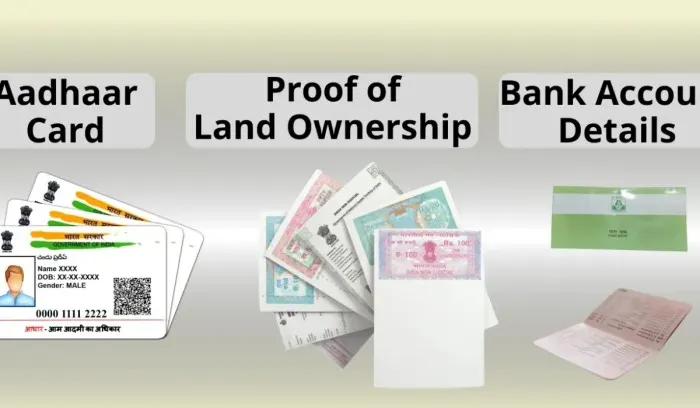
Keep these things ready. Do not start without them. Otherwise you will get stuck in the middle.
Make sure your mobile number is active. The government will send OTP on this number. Without OTP you cannot complete the application.
Now comes the main part. Follow every step exactly as written. Do not skip any step.
Open Google on your phone or computer. Type "pmkisan.gov.in. Click on the first link. Do not go to any other fake website. The real website has a blue colour scheme and a government seal.
On the homepage, look at the left side. You will see a section called "Farmers Corner". Under that section, click on "New Farmer Registration". This link is for new farmers only. Do not click on other links.
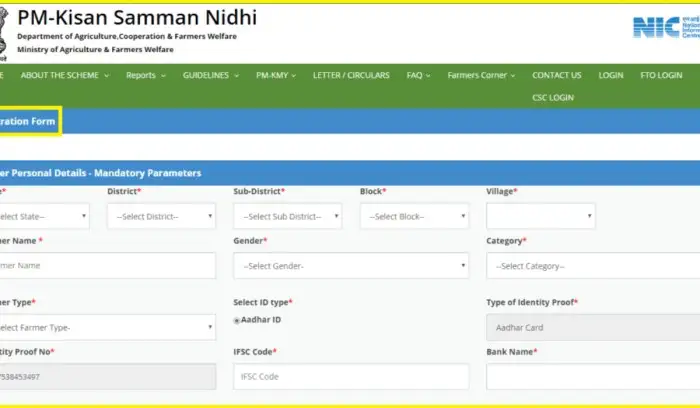
A new page will open. Here you have to enter your Aadhaar number. Type it carefully. Check twice. Then click on "Get OTP". You will get an OTP on your registered mobile number. Enter that OTP and click on verify.
After OTP verification, a long form will open. This form asks your personal details. Fill everything carefully.
Make sure your name is exactly the same as in Aadhaar. If there is a small difference, your application will get rejected.
You have to enter your land record number. This is also called Khata number or Khasra number. You can find this number in your land papers. If you do not know this number, ask your local patwari or village officer. Without correct land details, your application will not go forward.
You have to upload clear photos or scans of:
Make sure each file is small in size. The website does not take large files. Use your phone to take clear pictures. Do not upload blurry photos.
After filling everything and uploading documents, click on "Submit". A success message will show on screen. You will also get a registration number on your mobile. Save this number. You will need it for PM Kisan beneficiary status check later.
Many farmers ask this question. They think Aadhaar is separate from the form. But in reality, Aadhaar is the most important part of the application. You cannot apply without Aadhaar.
When you learn how to apply for PM Kisan Yojana online, the first thing you do is enter Aadhaar number. Then OTP comes on the mobile linked to that Aadhaar. This is how the government confirms that you are a real person.
If your mobile number is not linked to Aadhaar, you will not get OTP. In that case, go to any Aadhaar center near you. Get your mobile updated in Aadhaar. Then only you can apply.
Also make sure your bank account is linked with Aadhaar. This is not mandatory for application but it is mandatory for getting money. Without Aadhaar bank linking, the money will not come to your account.
So remember: To apply, you need Aadhaar. To get money, you need Aadhaar linked bank account.
After you apply, you will want to know if your name is in the list. This is called PM Kisan beneficiary status check. You can do this very easily.
The status can be:
Use any of these three methods. All give the same result.
PM Kisan status check is different from beneficiary status check. Beneficiary status tells you if you are a registered farmer. But PM Kisan status check tells you if you have received the money for a specific installment.
Farmers get very anxious before each installment. They want to know if the money has been sent to their bank. Here is how to check.
If your name is in the PDF, the money has been sent to your bank. If your name is not there, you have to wait for the next installment. Another way is to check your bank passbook. If the money comes, it will show as "PM Kisan" in your passbook.
You May Also Read: How to Choose Best Digital Marketing Tools for Small Business
Sometimes farmers apply but their name does not come in the list. Do not worry. This happens for small mistakes. Here are the common reasons.
Your name in Aadhaar is different from your bank account. The government matches both names. If there is even one letter difference, your application gets rejected.
Fix: Go to bank and update your name exactly as per Aadhaar. Or update Aadhaar as per bank. Then apply again.
Your bank account is not linked with Aadhaar. Without this link, money cannot be sent.
Fix: Go to your bank branch. Give Aadhaar number. Ask them to link it. Or use net banking or mobile banking to link Aadhaar.
You entered wrong Khata number or Khasra number. Or your land record is not updated.
Fix: Visit your tehsil office. Get correct land details. Then reapply.
You did not get OTP during application because mobile number is not linked to Aadhaar.
Fix: Go to nearest Aadhaar center. Get mobile number updated in Aadhaar. It takes 10 minutes and costs ₹50 (sometimes free).
After applying, if you change your bank account or update your Aadhaar, you must tell the government. Otherwise the next installment will not come.
This update takes 7 to 10 days to reflect. So do this well before the next installment date.
The government releases three installments every year.
You do not have to do anything to get these installments. Once you are a beneficiary, the money automatically comes to your bank account on these dates. Just keep your Aadhaar and bank details correct.
If you get stuck at any step, do not trust random people. Use these official resources.
If you are in a village with no internet, visit your nearest Common Service Center (CSC). The person there will help you apply for a small fee of ₹30 to ₹50. This is a government approved fee.
PM Kisan Yojana is a very helpful scheme for small farmers. The government wants every eligible farmer to get this money. But many farmers miss out because they do not know how to apply for PM Kisan Yojana online properly.
Now you know the full process. You know how to apply with Aadhaar card. You know how to do PM Kisan beneficiary status check. And you know how to do PM Kisan status check for each installment.
Take your time. Keep your documents ready. Follow each step exactly. If you make a mistake, do not worry. You can apply again after fixing the mistake.
Share this article with other farmers. Help them get their money. If every farmer gets ₹6000 every year, our farming community becomes stronger.
If you still have any doubt, call the PM Kisan helpline number. Do not pay any money to any person or website. The real process is completely free.
No. Aadhaar is compulsory. Without Aadhaar, the system does not let you enter the form.
No. Only one person per family gets the benefit. The family means husband, wife and minor children.
No. PM Kisan is for current farmers only. If you no longer own land, you must tell the government. Otherwise you will have to return the money later.
After your application is approved, you get the next installment. This can take 1 to 4 months depending on when you applied.
This means your mobile number is not linked to Aadhaar. Go to Aadhaar center and get it linked. Then try again.
Yes. The PM Kisan website works on mobile phones. Use Google Chrome or any browser. The steps are exactly the same.
Check your bank account Aadhaar linking. Also check if your bank account is active. Sometimes old accounts get frozen. Go to your bank and ask them.