How to Grow on Bluesky: Get Followers and Go Viral
Bluesky is not X. It is not Threads, it is not Instagram. That is the first thing you need to...
Gadgets & Technologies Are Together

Many families across India wait for news on their Pradhan Mantri Awas Yojana application. How to check PMAY application status online India is a common question these days. This scheme helps poor people build or buy homes, and knowing the status keeps everyone calm. You can check PMAY application status online India from home with just a phone or computer. No need to visit offices or stand in lines anymore
Pradhan Mantri Awas Yojana started in 2015 to give houses to all by 2022. Now PMAY 2.0 runs from 2024 to 2029 for 1 crore more homes. It covers cities and villages through PMAY Urban and PMAY Gramin. Families earning less than 6 lakh a year get help with loans or direct money for homes. Central money goes to states, and banks release it in parts.
People apply at block offices or online portals. After apply, they get an assessment ID. This ID helps track progress. Delays happen if papers miss or bank checks slow. But online check makes it easy to see if sanction came or money released.
Read More: How to Improve CIBIL Score Quickly in India
Waiting for house news stresses families. Online check shows if application approved, money sent to bank, or work started. You see stages like sanction, first payment, second payment, or house complete. If stuck, you know to fix papers. Banks and states update daily now in PMAY 2.0.
This saves travel to panchayat or urban office. Helplines busy, but website works 24 hours. Families track PMAY 2.0 track application status fast. No fees, just internet. In villages, common service centres help if no phone.
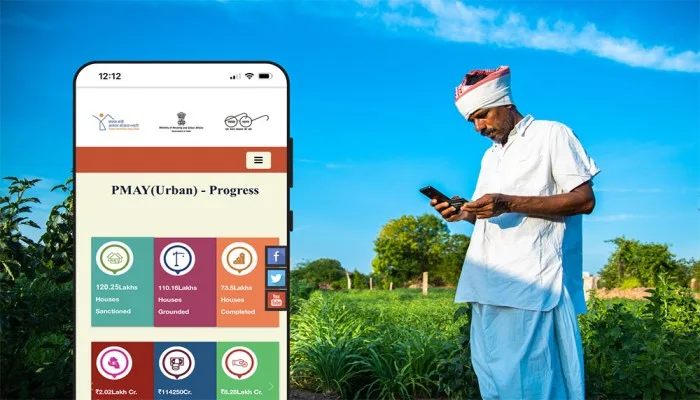
Two main sites handle checks. For PMAY Gramin, go to pmayg.nic.in. For PMAY Urban, use pmay-urban.gov.in. Both have track status page on home screen. PMAY MIS site at pmaymis.gov.in works for both in some states. Always pick site by your scheme type.
PMAY 2.0 added better portals with Aadhaar link. Mobile app UMANG also shows status. Download from Play Store, search PMAY, and log in. Pages load fast on Jio or Airtel net.
Assessment ID comes when you apply. It is a long number like UP20240012345. Use this for quick check.
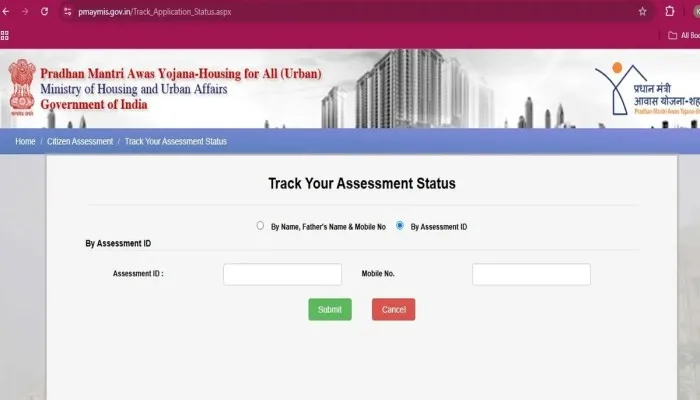
Go to pmaymis.gov.in or pmay-urban.gov.in. Click "Track Your Assessment Status" on home page. Pick "By Assessment ID". Type ID and your mobile number. Site sends OTP to phone. Enter OTP and click search. Screen shows full details like sanction date, bank name, amount released.
If no status, check ID correct or wait one week. Banks update after check. Print page or save photo for records.
Aadhaar makes search simple, no need ID. Many link Aadhaar at apply time.
On same track page, select Aadhaar option if there. Type 12 digit Aadhaar number and state. Some sites ask first 8 digits only. Enter registered mobile for OTP. Submit shows all applications on your name. PMAY status check with Aadhaar works for PMAY 2.0 Urban too. See if house work started or payment pending.
Not all states have this yet. If missing, use name search. Aadhaar helps if family applied multiple times.

PMAY 2.0 Urban for cities has extra features. Visit pmay-urban.gov.in. Go to citizen corner, track assessment. Choose urban scheme.
Enter details same as above. PMAY 2.0 track application status shows CLSS subsidy if you took bank loan. CLSS tracker page separate for credit linked subsidy. Type loan account or app ID. See if subsidy approved by HUDCO or NHB.
App work started? Site shows photo upload status. States like UP, Bihar update real time.
You May Also Read: How to Activate Jio 4G APN Settings Android | Fast Net Guide
No net? Go to gram panchayat for Gramin or municipal office for Urban. Ask for printout. They check on their computers.
Call toll free numbers. For HUDCO 1800 11 6163, NHB 1800 11 3377 or 1800 11 3388. Give ID or Aadhaar, agent tells status. MoHUA line 011 23063285 for queries. UMANG app works offline after first login in some areas.
PMAY 2.0 has geo-tagging. Site shows map of your house location.
Checking PMAY application status online India saves time and worry for families waiting for their dream home. Use the steps above on pmaymis.gov.in or pmay-urban.gov.in to track PMAY 2.0 track application status anytime.
Link your Aadhaar or mobile number early to make PMAY status check with Aadhaar or PMAY status check with mobile number simple. Stay in touch with your block office if delays happen. Government schemes like PMAY help build strong homes across India keep checking and your house news will come soon.
Status shows in 7 to 30 days. Banks need time to check papers before updating on PMAY 2.0 track application status page.
Yes, go to track page and pick Aadhaar option for PMAY status check with Aadhaar. Enter 12 digits and mobile OTP to see details fast.
Check name spelling and state. Registered mobile must match visit panchayat to update if changed.
PMAY 2.0 has faster online tools and more houses till 2029. Track on same sites with better maps and photos.
Bank delay common call bank or helpline 1800-11-6163. PMAY status check with Aadhaar helps confirm next steps