Best Slideshow Maker for Facebook Photos: Free Tools
Facebook is still the biggest social network. Photos get attention but a slideshow with music gets more. It tells a...
Gadgets & Technologies Are Together

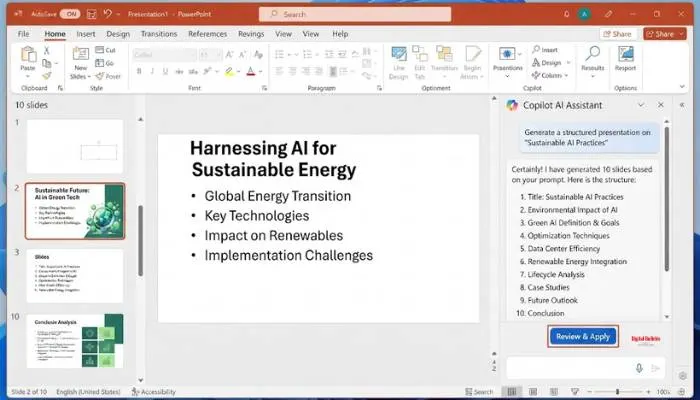
Presentations take forever to build. You stare at a blank screen. You waste hours on fonts and layouts. AI tools fix this. An AI slideshow generator for presentations turns your idea into a complete deck in minutes. You type a topic, upload a document, or paste a meeting transcript.
The AI handles structure, design, and formatting. You focus on the message. This article covers the best free AI slideshow generators in 2026. We tested tools like Prezi AI, Templafy, Gamma, and Simplified Riley. We looked at what they do well and where they fall short. No fluff. Just tools that save you time.
The old way is dead. You do not need to start from a blank slide anymore. AI slideshow generators turn a simple prompt, meeting transcript, or document into a polished presentation with professional layouts .
These tools handle the boring stuff. Structure, design, formatting. You focus on the message. Some tools even generate speaker notes and images for you.
Read More: How to Create Engaging Slideshows That Keep Your Audience Hooked

Zoom Slides is an AI-first presentation tool inside Zoom Workplace. You can describe what you need in plain language, and the AI generates a complete set of slides with smart layouts and structured content .
What makes it special is the meeting-to-deck pipeline. After a Zoom Meeting, you can pull in meeting summaries and transcripts. The AI identifies key themes and organizes them into a logical slide sequence with speaker notes .
Prezi AI is the only free tool that gives you full AI generation with no third-party branding on your output. The free plan covers creating, refining, and sharing presentations publicly via link .
The cinematic dynamic canvas format is engaging for presentations. The limitation is public-only sharing. Works well for students, educators, and public-facing content.
Templafy's free PowerPoint agent creates complete presentations that actually work in PowerPoint. No credit card required. Just write a prompt or upload a file, choose a theme, and it generates a fully editable PowerPoint file .
Most AI tools export files that break in PowerPoint. Fonts substitute. Layouts shift. Templafy solves this problem. The output is business-ready and works inside Microsoft 365.
Riley is an AI agent from Simplified. Brief it with a one-line ask. It picks a template, applies your brand colors and fonts, and hands back a complete deck in about 60 seconds .
Export as PDF, HTML, PNG, or ZIP. Do not like a slide? Tell Riley what is wrong and it redoes it. Brand Kit stays locked.
Gamma turns a prompt into a web-native deck in under 60 seconds. It is one of the fastest ways to get from an idea to a shareable deck. The free tier has 400 lifetime credits .
Gamma works well for internal updates and quick drafts. The watermark on free shared links is only a barrier for external professional use.
You May Also Read: AI Slideshow from Images: Best Free Online Maker Guide

| Tool | Best For | Key Limitation |
|---|---|---|
| Prezi AI | Public presentations | Public-only sharing |
| Templafy | PowerPoint users | Requires editing |
| Simplified | Brand consistency | Credit-based |
| Gamma | Speed | Watermark on free tier |
| NotebookLM | Research-based decks | Google ecosystem |
| Presenton | Privacy | Self-hosted setup |
AI slideshow generators save hours of work. You type an idea, upload a document, or describe what you need, and the AI does the heavy lifting. The free tools listed here cover most use cases. Start with what fits your workflow. You will wonder why you ever built a presentation from scratch.
Prezi AI is the only free tool that gives you full AI generation with no third-party branding on your output. It covers creating, refining, and sharing presentations publicly via link. If you use PowerPoint, Templafy's free agent works inside PowerPoint. Gamma is fastest for web decks but puts a watermark on free shared links.
Most tools require a free sign-up. Prezi AI, Gamma, and Simplified all need accounts. If you want no sign-up, open-source options like SlideMaker or Presenton let you run the tool locally. But they require some technical setup.
Templafy's free agent works directly inside PowerPoint. You write a prompt or upload a file, choose a theme, and it generates a fully editable PowerPoint file. Most other tools export files that break in PowerPoint, but Templafy solves this problem.
Yes. All the tools listed let you edit the output. Templafy gives you a fully editable PowerPoint file. Simplified Riley lets you tell the AI to redo specific slides. Prezi AI and Gamma let you edit content and layouts after generation.
Prezi AI on the free plan has no third-party branding on your output. Open-source tools like Presenton and SlideMaker have no branding because you host them yourself. Most commercial free tiers include some branding or watermark.
Yes. Zoom Slides is designed for this. It pulls meeting summaries and transcripts, identifies key themes, and organizes them into a logical slide sequence with speaker notes. NotebookLM also works if you upload the meeting transcript as a source document.
Gamma and Simplified Riley both generate decks in under 60 seconds. Gamma is web-based and focused on speed. Riley picks a template, applies your brand colors, and hands back a deck in about one minute. Both are good for quick drafts.