How to Protect Personal Data from AI: Practical Steps That Work
AI tools collect more data than most people realise. Every prompt you type. Every file you upload. Every conversation you...
Gadgets & Technologies Are Together

AI agents are changing how businesses handle customer support. If you are wondering how to use AI agents for customer support, the answer is simpler than you think. An AI agent is a tool that talks with your customers through chat or email to solve their problems.
It pulls answers from your help center or website. This gives customers fast help any time of day. It also takes simple questions off your team's plate. Your people can then focus on harder issues that need a human touch. The goal is not to replace people but to make your whole support system faster and smoother.
An AI agent is a tool that talks with your customers through messaging or email to solve their problems without a person stepping in . It works by pulling information from your help center, website, or other sources to give quick, correct answers. This frees up your team to work on harder issues.
Read More: How to Get YouTube Money in India 2026 Full Guide
Businesses are switching to AI agents for a few clear reasons. Customers want fast answers. They don't want to wait on hold or for an email reply. AI agents work 24/7, so help is always there . This cuts down the number of requests your human team gets. Simple questions go to the AI, and your people handle the tough stuff. For example, Zendesk's own team resolves over 60,000 support requests each quarter using AI agents . That frees up their people to focus on complex problems.
AI agents do more than just answer basic questions. Here are some real ways they help.
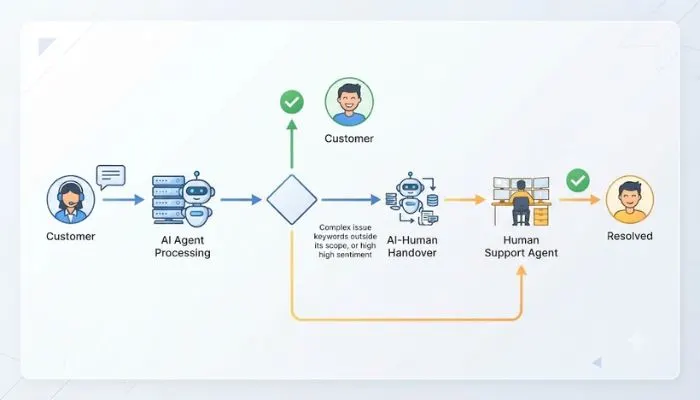
An AI agent can handle a full customer conversation from start to finish. It greets the customer, understands their issue, pulls the right answer from your knowledge base, and resolves it . If it can't solve it, the agent passes the conversation to a human with all the details already collected . The human doesn't have to ask the customer to repeat anything.
You can put AI agents on your website chat, email, WhatsApp, Facebook, and Instagram . Customers get the same experience no matter where they reach out. This is important because people expect to talk to you on their preferred app.
This is where AI agents get really useful. They are not basic chatbots. They can reason through a problem and take action. For example, in a travel support system, one main AI agent can route a customer's question to a specialist agent. There can be separate agents for flights, hotels, car rentals, and activities . Each one focuses on its own area, giving better answers. They can even update bookings or cancel reservations.
When an issue gets too hard or the customer is upset, the AI agent can hand it off to a human agent. The key is that it shares all the context of the conversation . The human sees what the customer already said and what the AI tried. This saves time and makes the customer feel heard.
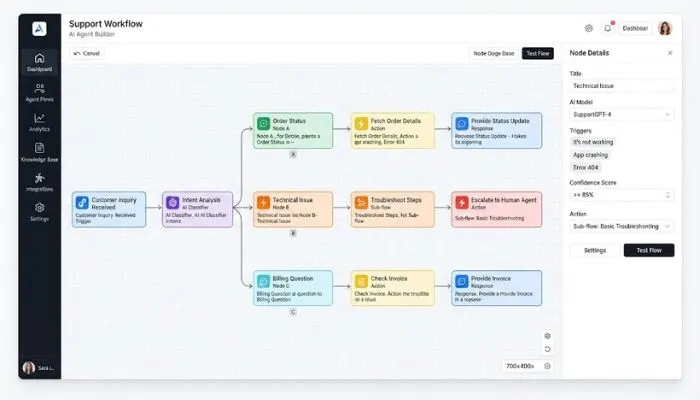
Setting up an AI agent is simpler than you might think. Most tools are "no-code," meaning you don't need to be a developer . Here is the basic process.
Log into your support platform (like Zendesk, Freshworks, or Microsoft Copilot Studio) and find the AI agent builder . Click to create a new agent. Give it a name that fits your brand.
This is the most important step. The AI agent needs information to answer questions. Connect your help center articles, FAQs, website content, and product documents . The AI learns from these. Think of it as giving the agent your company's brain. Well-organized content leads to better answers.
Give the AI a personality that matches your brand . Choose its tone. Do you want it to sound professional, friendly, or informal? You can also upload an avatar. This makes the interaction feel more personal.
Customize the messages the AI uses. Set a greeting, a message for when it needs to escalate, and a failure message for when it cannot answer . These small touches make the experience better for customers.
Before you turn it on, test the agent to make sure it gives the right answers . Once you are happy, map it to your channels. You can put it on your website chat, email, WhatsApp, or others . One click, and it is live.
After it goes live, check how it is doing. Look at metrics like resolution rate, how many conversations it handled, and how many it passed to humans . Find unanswered questions and add those answers to your knowledge base. This keeps the agent getting better over time.
You May Also Read: How to Open PPF Account Through SBI Online Full Step by Step Guide
Seeing how others use AI agents can give you ideas. Here are a few real-world examples.
Zendesk uses its own AI to handle support for its customers. The AI resolves complex tasks like enabling features or executing bulk user imports . It does this based on the customer's permissions and real-time data. They saw a 120% increase in high-quality answers from their AI.
Mobilezone, a telecom retailer in Switzerland, built an AI agent named Mia . Mia is on their website and handles product questions, subscription changes, and store information. It speaks multiple languages. Since launching, Mia serves over 200,000 users. It has cut down on calls to their contact center and helped increase online sales.
A travel company built a system with multiple AI agents . A main agent takes the customer's question. If the customer asks about flights, the main agent sends that question to a flight specialist agent. If they ask about a hotel, it goes to a hotel agent. This means the customer gets a specialist response without knowing they are talking to multiple AI agents.
AI agents are a practical way to improve your customer support. They answer questions fast, work on any channel, and handle complex tasks. They give your human team time to focus on what they do best. The setup is straightforward and does not require coding. By starting with the simple steps above, you can have an AI agent helping your customers within days. The result is faster support, happier customers, and a more efficient team.
A basic chatbot follows a set script. It can only handle very simple questions. An AI agent can understand context, learn from conversations, and take actions like updating an order or creating a ticket . It is much smarter and more flexible.
No. AI agents handle the repetitive, simple questions. This lets your human team focus on complex problems, upset customers, and situations that need empathy . They work together. AI handles the volume, and humans handle the value.
Most platforms include AI agents in their plans, or they charge based on usage, like "automated resolutions" . Costs vary, but many platforms offer a trial so you can test before you commit.