How to Choose Hashtags for Social Media Posts: A Simple Guide
Hashtags will not save a bad post but they can help a good one get seen. Most people get them...
Gadgets & Technologies Are Together

AI writing tools are everywhere now. People use them to write blog posts, emails, and social media captions. But many do not know how to use them properly. They paste a prompt, copy the output, and publish it. That is a mistake. Learning how to use AI for content writing the right way makes a huge difference. It saves time.
It improves quality. But you need to know the rules. You need clear prompts. You need to edit the output. You need to add your own voice. This article covers practical tips for using AI effectively. We also look at free tools that actually work. No fluff. Just useful
AI writing tools use large language models. These are trained on massive amounts of text from the internet. They learn patterns in language. When you give them a prompt, they predict what words should come next.
They do not actually think. They do not understand your topic the way you do. They just match patterns. This is important to remember .
AI is great at generating a first draft. It can help you overcome that blank page. It can summarize long documents. It can rewrite sentences. But it is not always truthful. It hallucinates. It makes stuff up. You have to check everything .
Read More: How to Use AI Agents for Customer Support Effectively
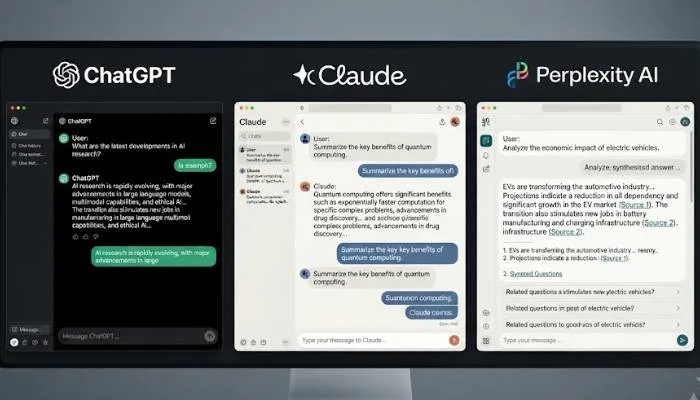
You do not need to spend a lot of money to get started. There are plenty of free AI writing tools available.
ChatGPT is the most popular option. It is versatile and handles everything from brainstorming to drafting. The free tier gives you access to GPT-4o. It works well for general writing, ideation, and quick repurposing. Just remember to edit the output to match your brand voice .
Claude is better for long-form writing. It has a large context window. You can feed it briefs, transcripts, or research and get structured writing back. It is great for turning a webinar transcript into an article or drafting a white paper. Claude has a free tier available .
Perplexity is best for research. It gives you citations and links to source material. This helps you verify information before using it. Great for finding recent statistics and trends. Always double-check the sources .
Groq is a free AI provider that works through plugins like Quillsy and Synthocode Content Copilot. You get 14,400 requests per day at no cost. No credit card needed. This is perfect for WordPress users who want to generate articles directly in their dashboard .
Google's Gemini is another free option. It has a free tier with a daily quota. It is multimodal, meaning it handles text, images, and code. You can use it through Google AI Studio .
If you run a WordPress site, several free plugins can help you generate content directly in your editor.
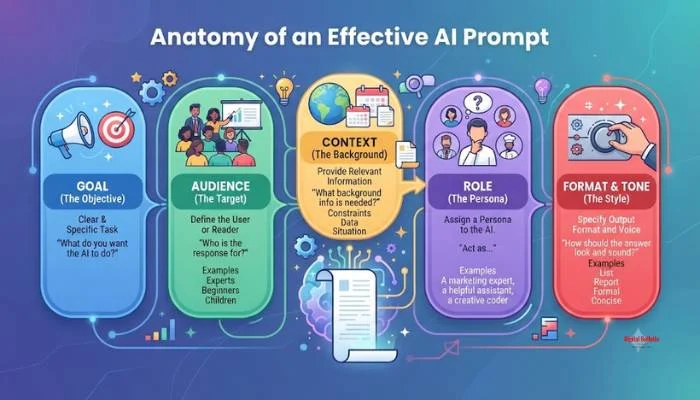
The quality of AI output depends on your prompt. Bad prompts give bad results. Good prompts give useful results .
Here is what goes into a good prompt.
Do not ask for multiple things at once. Pick one task. Are you generating a blog post. Are you summarizing an article. Are you drafting a product description. Be specific .
Tell the AI who you are writing for. Are you talking to new hires on your team. Are you writing for software engineers. Are you addressing the vice-president of marketing. The audience changes the tone and content .
Give the AI enough information. Include key features to highlight. Mention the desired tone and style. The more detail you provide, the better the output .
Show the AI what you want. Include sample sentences, paragraphs, or structures. This gives the tool concrete references to follow .
Tell the AI to impersonate a role. "You are an expert technical writer" or "You are a patient senior software engineer." This helps the AI generate better responses .
Here is an example of a good prompt:
"Generate a product description for a new line of eco-friendly reusable water bottles. The tone should be informative and engaging, targeting environmentally conscious consumers. Highlight the durability, sustainability, and design features. Use clear, concise language" .
This prompt works because it outlines the task, audience, tone, and key features.
Here is a bad prompt:
"Write about water bottles."
This prompt lacks clarity and specificity. The AI has no idea what you want. You will get generic, useless content .
Do not use complicated language or include too many details. This confuses the AI. Keep it clear and simple .
Insufficient context makes it hard for the AI to produce relevant content. Include the purpose, audience, tone, and specific requirements .
Understand what the AI can and cannot do. It is not always truthful. It hallucinates. Check everything before you publish .
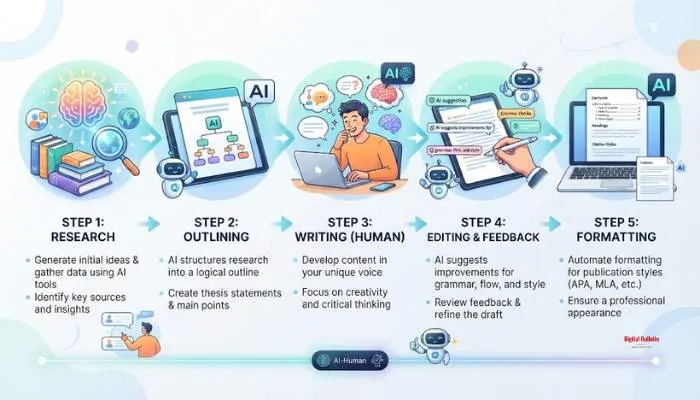
The best way to use AI is at the edges of the writing process. Keep the actual writing human. Use AI for research, outlining, editing, and formatting .
Use AI tools like Perplexity or NotebookLM to learn about your topic. Find recent statistics. Gather source material. Build confidence in the subject .
Use an AI content brief tool to generate a structure. Review the suggested audience and sections. Add or remove subheadings to make it your own .
This is the human step. Write your draft without AI help. Let your voice and expertise come through. Do not just copy-paste from the AI .
Use AI to polish your draft. Run it through an AI editor for suggestions on clarity and flow. Use the tool to find passive voice or grammatical errors. But make the final edits yourself .
Use AI to improve readability. Ask it to add key takeaways, bolded callouts, and tables. But think of the output as suggestions. Modify it to fit your style .
You May Also: How to Open PPF Account Through SBI Online Full Step by Step Guide
AI content often sounds generic. It lacks personality. Here is how to keep your writing human.
AI is a powerful writing assistant. It can help you research faster, outline better, and polish your drafts. But it is not a replacement for human judgment and expertise.
The best approach is to use AI at the edges. Use it for research, outlining, editing, and formatting. Keep the actual writing human. This way you save time without sounding like a machine .
Start with free tools. Learn how to write effective prompts. Practice your workflow. Over time, you will figure out how AI fits into your writing process. And your content will get better for it.
Yes. ChatGPT has a free version. Claude offers a free plan. Perplexity is free for research. Groq gives you 14,400 requests per day. Google Gemini has a free tier. WordPress users can use Quillsy and Synthocode for free. No credit card needed for most of these.
Depends on your need. ChatGPT is good for quick drafts. Claude handles long pieces. Perplexity gives you sources you can check. Quillsy works inside WordPress and turns a keyword into a full post. Try each one. See what clicks.
Write a clear prompt. Tell it who you are writing for. Mention the tone and key points. Give an example if you have one. Say "You are a content writer." Vague prompts give vague results. Specific prompts give useful output.
No. AI does not have your judgment or voice. It makes things up sometimes. It cannot share real experiences. Use it to speed up research and editing. Keep the actual writing human. That combination works best.
Publishing the AI output as is. The first version always needs work. It sounds flat. Facts might be wrong. You have to rewrite, check everything, and add your own style. Think of AI as a draft writer. You are the editor and final voice.